
Temp Email for Amazon online store
Online shopping is part of our daily lives now. Millions of people hit "buy" every single day, and Amazon is usually the place they go first. It’s the biggest store in the world for a reason. It's fast, it’s easy, and they have everything. But that convenience has a hidden cost. Every time you sign up, you’re handing over your personal email address. Suddenly, your inbox is drowning in marketing ads, shipping updates, and "deals" you never asked for. Plus, there is always the worry about how your data is being used or shared. This is exactly where temp email comes into play.
What Exactly is a Temporary Email?
If you haven’t used one before, a temporary email is exactly what it sounds like. It is a short-lived email address that you can use for specific task. Think of it like a burner phone for the internet.
How the service works
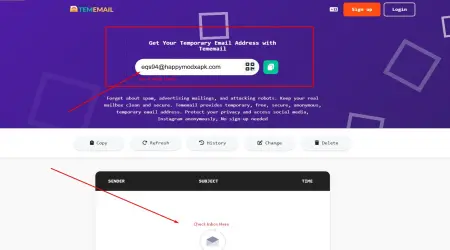
You don't have to go through a long sign-up process. You don't need to give your name, your phone number, or your home address. You just visit our website that generates a random email address for you. It might look like a bunch of gibberish, like k3j7n2@ tempmail.org
Once the site gives you that address, you have a temporary inbox. You can receive email right there in your browser. You can click confirmation links or copy verification codes. But here is the catch: it doesn't last. Some disappear in 10 minutes, some last a few hours, and some stay active as long as you keep the browser window open. Once that time is up, the address is deleted. Anyone trying to send mail to it later will just get an error.
The big benefits
The most obvious benefit is that it isn't linked to your real identity. Your real email address is likely connected to your bank, your job, and your family for personal use. A temp mail address is a blank slate. It protects your primary inbox from getting cluttered, and it keeps your personal data out of big corporate marketing databases.
Why Use Temporary Email for Amazon?
1. Keeping your personal info private
Big E-commerce companies want to know who you are, what you buy, and how often you spend money. When you use your real email or real data on Amazon, you’re helping them build a massive profile on you. If you use a temporary email, you break that link. It’s a simple way to stay a bit more anonymous in a world where everyone is tracking your every move.
2. Reduce spam
Amazon sends a lot of mail daily or weekly. You get an email when you order, when it ships, when it’s delivered, and then they ask you to review the item. Then come the newsletters. If you’re just buying a one-off item maybe a gift for someone, or something you don’t want on your "main" account, using a temporary email address keeps all that junk out of your life.
3. Multiple Amazon accounts
Many people create multiple Amazon accounts for various reasons , such as get discounts offer, use different payment methods, or track different delivery addresses. Signing up for multiple accounts is easy with temporary email instead of using your personal email address.
How to Actually Use it on Amazon
If you want to try this, you can’t just wing it. Amazon is pretty smart about security, and if you do it wrong, they’ll just lock your account immediately.
Step-by-step guide:
It's very easy to use temp mail with Amazon. This is a step-by-step guide to help you get started:
- Use a temporary email. tememail.org and other reliable services offer free temporary email addresses. This platform provides instant access to a temporary inbox without registration. Just search for "temp mail.org" or "temp mail."
- Create temporary email address. After choosing a reliable temporary email service, just click "change or delete" to get a random email address, copy the address. You can sign up for anything with this email, including Amazon, Meta, Netflix.
- Go to Amazon and start the sign-up process. burner email address instead of your real email address.
- Wait for the OTP. Amazon will send you a One-Time Password (OTP) to verify you’re account. Go back to your temporary email provider’s website tab. Open your inbox, the email should show up in a few seconds. Verify your account by clicking the link sent by Amazon.
- Browse the Amazon account buy what you need and check out
Tips for doing it effectively
Keep that tab open! Many people make one mistake mostly. They sign up, get the code, and then close the temporary email site. But they don't know Amazon asks for another verification a few minutes later. Al this time user can’t get back into the inbox. So keep the tab open until you are 100% done.
Save your order number: Since the email will vanish, you won't have a receipt in your inbox later. Take a screenshot of the order confirmation page. If something goes wrong with the delivery, that screenshot is the only proof you have.
Conclusion
For the right job, temporary emails are very useful. Using a temporary email for Amazon is a good way to keep your inbox clean, protect your privacy, and reduce spam. Temporary email services are a quick, safe, and effective way to stop ads, protect your personal email from data breaches. You can enjoy the benefits of Amazon without giving up your personal information if you follow the steps above.